How do I print a free hexagon grid in the size I need?
A4 paper. Hexagon sides are 1 cm.
You can print a free hexagon grid right on this page, in the hexagon size you need. Choose Small, Medium or Large, and the sheet appears on the page with a flat side on top. One press prints it. Save it as a PDF if you want a file, or as a PNG or JPG picture. No photo, sign-up or app is needed, and the paper size follows your browser’s region.
More settings
A hexagon grid is a sheet covered in six-sided cells with no gaps between them, also sold as hex paper or hexagonal graph paper. Choose a hexagon size above and the sheet is ready to print or save as a PDF. Under “More settings” you can turn the hexagons to a corner on top and change paper, page direction, line width and edge space.
How to print a hexagon grid
Choose a hexagon size
Press Small, Medium or Large. Each hexagon side is 1/4, 1/2 or 1 inch long on Letter paper, and 5 mm, 1 cm or 2 cm long on A4.
Adjust the sheet if needed
Open “More settings” to put a corner on top or to switch the paper. You can also set a tall or wide page, change the line width or change the space around the edge.
Print the sheet
Press “Print hexagon grid”. When the print dialog opens, set the scale to 100% (some printers call it actual size). Turn off fit to page, so every hexagon keeps its true size.
Or save a file
Press “Save as a PDF” to keep the sheet. Under “More settings” you can also save it as a PNG or JPG picture on a white background.
Match the hexagon size to the job
Start with what each hexagon has to hold. For a tabletop map, Large hexagons leave room to write a terrain note or a unit name inside each cell. Medium hexagons suit a regional map where most cells only get a shade or a small symbol. Small hexagons fit a whole continent on one sheet, one mark per cell. If the first sheet feels cramped or empty, print another size and compare the two side by side.
Choose a flat side or a corner on top
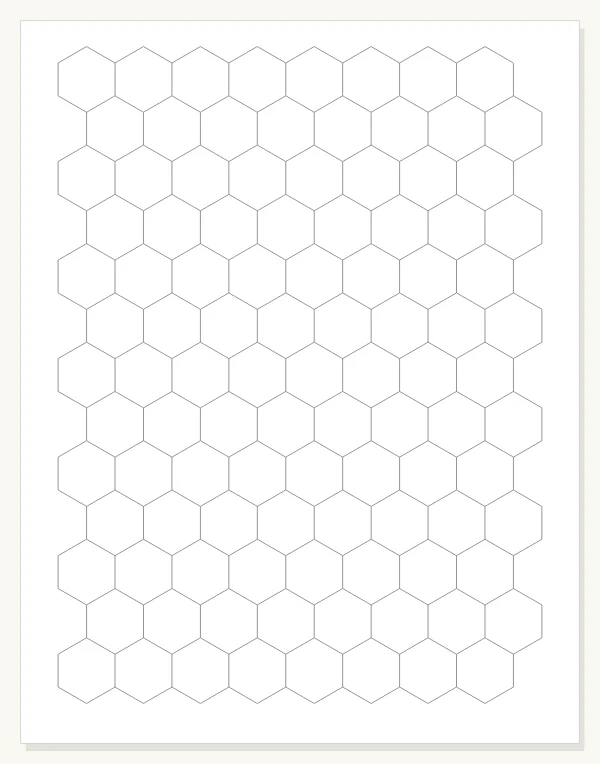
With a flat side on top, the columns run straight up and down the page and each hexagon is wider than it is tall. With a corner on top, the rows run straight across like lines of text, with every second row shifted half a hexagon. Pick the corner-on-top layout when you want to write labels along rows. Pick the flat-top layout when you think of the map in vertical strips. Both are quick to print, so try each on scrap paper.
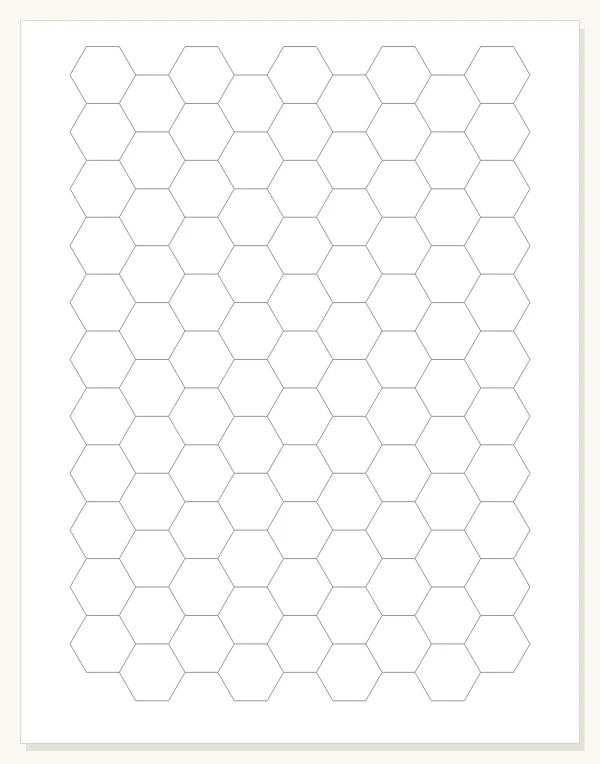
A Letter sheet with 1/2 inch sides, flat side on top.
The same sheet with a corner on top.
Build a map on the printed sheet
Draw in pencil first. Sketch a coastline or a dungeon outline lightly, then give each hexagon one thing: land, water, forest, road. A cell that is mostly land counts as land. Keep one rule for every cell so the map reads the same everywhere. Print two copies: one for rough drafts and one for the clean version you will ink and color.
Number the hexagons by hand
Add your own coordinates. A common habit is letters for columns and numbers for rows, written small in the top corner of each cell. Number only the cells you need to refer to, such as towns, camps or start points, so the sheet stays easy to read.
How to number a map on hex grid paper
This sheet prints no numbers, so you add them. First look at how the sheet is laid out. With a flat side on top, the hexagons form straight vertical columns, and each column sits half a hexagon lower than the one beside it. With a corner on top, the rows run straight across, and every second row is shifted half a hexagon.
The most common way to number such a map is to name the straight lines and skip the shifted ones. For a flat-top sheet, give each column a letter and each row in that column a number, counting from the top left. For a corner-on-top sheet, number the rows and letter the columns the same way. Write the name small inside each cell, such as B3, and use the same corner as the start on every sheet.
Plan for one catch. A hexagon has six neighbors, and which cells they are depends on the column or row you stand in, because every second one is shifted. Write down the rule once, so a game or a story uses it the same way every time. For example, on a flat-top sheet whose first column sits highest, from B3 the cell to the lower right is C4, but from C3 it is D3. If you play with a group, write the numbers on one sheet by hand, then copy it for everyone, so everyone reads the same map.
Uses for a hexagon grid outside games
Hexagons fill a surface with no gaps. The honeycomb theorem states that a hexagonal tiling is the best way to divide a surface into regions of equal area with the least total perimeter. That is one reason the cells of a honeycomb are hexagonal, and a hex sheet is a good place to plan a honeycomb pattern or a repeating tile.
Hexagonal tiling also turns up in science. The sheet of graphene is a hexagonal tiling of carbon bonds, so a hexagon sheet suits a quick diagram of rings. Artists use it for tessellations and pattern studies, and sewers use it to draw a template with a known side length before cutting card or fabric. For these jobs, pick Medium or Large hexagons so each cell is easy to trace.
Make quilting and geometric art templates
Print Medium hexagons and measure one side with a ruler. Cut one hexagon out and trace around it on card to make a template with a known side length. For a flower shape, color one hexagon in the center and surround it with six more. Colored pencils or fine pens work well on the printed lines, and a thicker line width makes the edges easier to trace.
Only whole hexagons are drawn, centered across the page.
Draw rings and diagrams
A hexagon grid helps when a diagram is built from six-sided shapes. Students sketching six-membered rings can use each hexagon side as one bond and keep the angles even. Designers planning a honeycomb pattern or a board layout can fill cells with color to test a repeat before drawing the final version.
Prepare the sheet for pencil, ink or tracing
Decide how the sheet will be used before you print. For pencil work, keep the lines thin so they stay out of the way and erase cleanly. For inking or tracing over a light table, thicken the lines so they stay visible through the page. If you plan to punch holes for a binder, raise the space around the edge in “More settings” so the holes miss the hexagons. Print on plain paper for drafts and save heavier paper for the final copy.
Try a few practice ideas
Draw a line from the center of one Large hexagon to three corners that alternate around the edge. The shape becomes a cube, and shading its three faces in light, medium and dark gives a solid look. Fill a block of cells in a repeating color order to see a pattern appear. Race a friend to link two opposite edges of a sheet by coloring touching cells in turn. Each exercise trains the eye to see how six-sided cells fit together.
FAQ
Where can I find a free hexagon grid generator with a printable PDF?
Right here. Choose Small, Medium or Large hexagons, then press “Save as a PDF” or print the sheet directly. It is free, needs no sign-up and adds no watermark. PNG and JPG versions are under “More settings” if you prefer a picture.
What is a hex grid, and is it the same as hexagonal graph paper?
Yes. A hex grid is a sheet of six-sided cells that fit with no gaps, and on paper it is called hexagonal graph paper or hex paper. Each cell has six equal sides, much like the cells of a honeycomb.
Should the hexagons point up or lie flat?
Flat-top hexagons have a flat side facing up, while pointy-top hexagons have a corner facing up. The sheet starts with a flat side on top. Open “More settings” to turn the hexagons so a corner points up.
Which hexagon size suits a tabletop game map?
Decide first what one hexagon stands for, then pick the size that leaves room for your notes. Large hexagons suit written labels inside each cell. Medium suits shading terrain. Small fits a wide overview on one sheet.
How do I make the hexagons print at the size I chose?
When the print dialog opens, set the scale to 100% and leave fit to page and shrink to fit switched off. Then measure one hexagon side with a ruler. It should match the size you picked: 1/4, 1/2 or 1 inch, or 5 mm, 1 cm or 2 cm.
What paper sizes and margins are supported?
Letter or A4 is chosen from your browser's region. Under “More settings” you can also pick A3, Legal or a 21 cm square page. You can set the page tall or wide and change the space around the edge. Only whole hexagons are drawn, centered across the page.
Can I change the line thickness of the hexagons?
Yes. Line width is under “More settings”. Thicker lines show up better on a photocopy or when you ink over them, and thinner lines stay out of the way of pencil drawing.
Updated
Related tools
- 10x10 gridPrint a blank 10x10 grid with 100 squares in three sizes. Add numbers 1 to 100, then print the sheet or save it as a clear PNG.
 4 Quadrant Graph PaperPrint free 4 quadrant graph paper with bold x and y axes, numbered both ways from 0. Pick square size and paper, then save as PDF, PNG or JPG.
- 8x8 gridPrint a free 8x8 grid of 64 squares in your browser. Pick Small, Medium or Large squares, add letters and numbers, then print or save a PNG.
 Add grid to photoAdd a grid to any photo in your browser, with no sign-up and no watermark. Get a numbered grid or a plain grid overlay, then save it or print it at true size.
- Ar TracingInstead of ar tracing with a phone stand, put a numbered grid on your own photo, then save or print it and copy it square by square. Free, no sign-up.
 Aspect Ratio CalculatorUse this aspect ratio calculator to turn a width and height into a ratio like 16:9. You also get the decimal and a resize that keeps the shape.
- Atmospheric PerspectiveAdd a numbered grid to a photo and compare near and far squares to see atmospheric perspective: lighter values, softer color. Free, in your browser.
- Bargue DrawingPractice Bargue drawing from your own photo: add a numbered grid with 5, 8 or 12 squares across, then save it or print a gridded sheet and an empty one.